AI Chatbot vs AI Website Assistant: What Is the Difference?
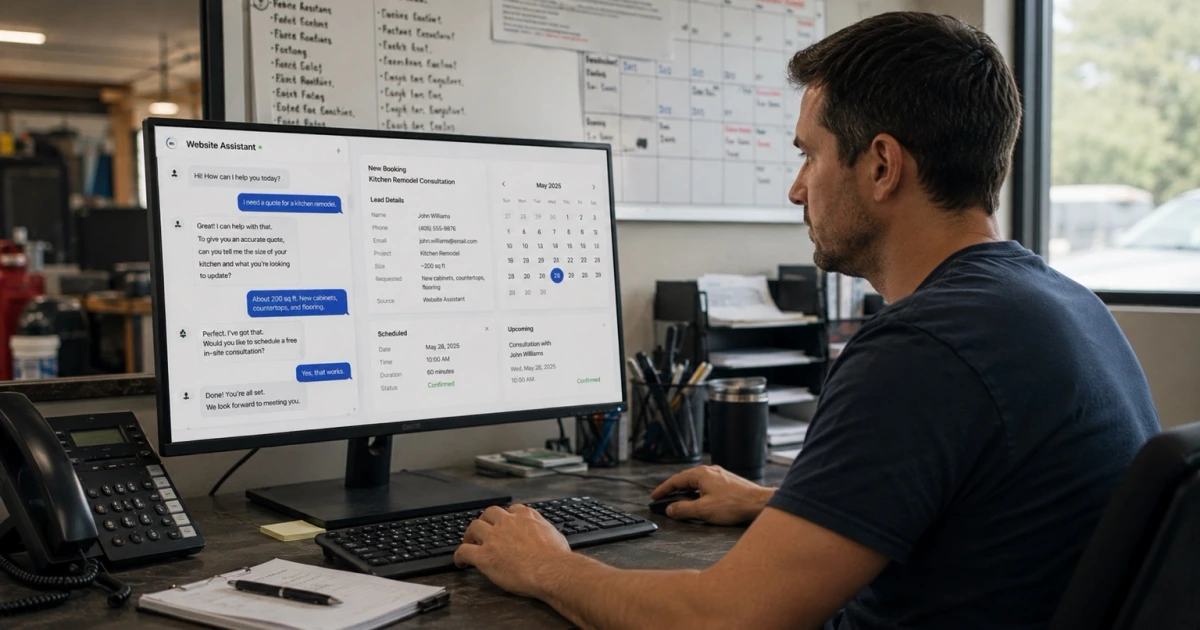
Most service businesses that ask for "a chatbot" for their website don't actually want a chatbot. They want fewer leads slipping through the cracks after hours, fewer visitors who leave without booking, and less time spent answering the same five questions by phone. That's a different problem than the one a chatbot solves, and the difference between an AI chatbot vs AI website assistant is exactly where that mismatch shows up. Understanding it before you buy anything saves you from paying for a chat widget that talks, but doesn't actually move a lead forward.
This matters most for local and appointment-based service businesses—HVAC, roofing, plumbing, construction, millwork, med spas, clinics, and similar operators—where a website visitor is either a job or a no-show, and the gap between the two is often just what happened in the first sixty seconds of contact.
What Is an AI Chatbot?
An AI chatbot for service businesses is, at its core, a question-and-answer tool. A visitor types something, and the chatbot matches it to a scripted or AI-generated response: your hours, your service area, a general price range, a link to a form. Most run as a widget bolted onto the website, separate from your calendar, your CRM, and your team's inbox. The good ones answer accurately and reduce simple back-and-forth. The limitation isn't the answer quality—it's that the conversation usually ends there. Nothing gets qualified, nothing gets routed, and nothing gets booked. The visitor still has to take the next step themselves, usually by calling or filling out a separate form.
What Is an AI Website Assistant?
An AI website assistant starts from the same conversation window but is built to finish the job, not just answer the question. It asks the qualifying questions a front-desk person would ask—what's the issue, what's the timeline, is it urgent—and uses the answers to do something: route an emergency request differently than a routine one, offer real open times from your calendar, or flag a job that needs a quote instead of a quick answer. It writes what it learns back into your CRM, so a conversation becomes a record your team can act on instead of a chat log someone has to remember to check.
AI Chatbot vs AI Website Assistant: What's the Real Difference?
Put side by side, the gap is less about how "smart" the AI sounds and more about how much of the actual intake work it finishes.
| What happens on your site | AI Chatbot | AI Website Assistant |
|---|---|---|
| Answers common questions | Yes | Yes |
| Qualifies the visitor's request | Rarely | Yes |
| Routes by urgency or job type | No | Yes |
| Books from your live calendar | No | Yes, when connected |
| Summarizes the conversation for staff | No | Yes |
| Writes back to your CRM | No | Usually |
| Hands off to a person when needed | Sometimes, by default | Yes, by design |
That last row matters as much as the others. A chatbot that can't answer something usually just repeats itself or dead-ends. A website assistant is built to recognize when a visitor needs a person and hand off cleanly, with the details already captured.
When Is a Simple Chatbot Enough?
A basic chatbot is a fine, low-cost choice for a website chatbot for service business use when the site's job is narrow: a small, simple business with a short list of common questions, light traffic, and a single obvious next step (call this number, fill out this form). If nobody's currently losing leads to slow responses or missed follow-up, adding qualification and booking logic is solving a problem you don't have yet. There's no reason to overbuild a site that already converts the visitors it gets.
When Do You Need an AI Website Assistant?
The calculus changes once your website is a real lead-capture chatbot channel—not just an FAQ page—and visitors expect to book, ask something specific, or get triaged by urgency. Signs it's time: staff re-answering the same qualifying questions on the phone that a visitor already typed into chat; after-hours visitors leaving without any way to book or get contacted back; or leads arriving with no context, so the first callback is spent asking questions the assistant could have already collected. In those cases, an AI website assistant isn't an upgrade for its own sake—it's closing a gap the chatbot was never built to close.
A Bad Chatbot vs a Good System
A bad chatbot isn't bad because the AI is weak. It's bad because it was set up to talk, not to work: it answers the question it was asked and stops, it can't tell a same-day emergency from a general inquiry, and if a visitor leaves mid-conversation, nothing about them is saved. The visitor got an answer; your business got nothing.
A good system is judged differently. It captures the visitor's details even if they don't finish the conversation. It treats an urgent request differently than a routine one. It offers a real appointment time instead of "call us to schedule." And when a question is outside what it should answer—pricing exceptions, complaints, anything that needs judgment—it says so and routes it to a person instead of guessing. None of that requires flashier AI. It requires building the assistant around how your intake actually works, the same way we lay out for an AI call answering system and an AI voice agent: know the limits, and hand off instead of bluffing.
The Right Tool Is the One That Matches Your Intake
An AI chatbot and an AI website assistant aren't competing versions of the same thing—they're built for different jobs. A chatbot answers questions. A website assistant qualifies, routes, books, summarizes, and hands off, so a website visit turns into a captured lead instead of a conversation that goes nowhere. The right choice isn't about which sounds more advanced. It's about whether your site's only job is answering questions, or whether it's supposed to be doing the first stage of intake. The same logic applies to custom AI software versus off-the-shelf tools: match the tool to the actual gap, not the trend. Chat is only one of the features sold as a smart website, and we sorted through the rest in AI website tools for small businesses in Oklahoma.
At LoGa AI Systems in Oklahoma City, we build the website assistant as part of the full system—connected to your calendar, your CRM, and your team, so a chat on your site turns into a booked job or a routed lead, not just a saved transcript. If your website is answering questions but not capturing the leads behind them, that's the gap worth closing first.
Frequently asked questions
What is the difference between an AI chatbot and an AI website assistant? A chatbot mostly answers questions—hours, pricing ranges, services, location—inside a conversation window. A website assistant does that too, but it also qualifies the visitor, routes them to the right next step, offers to book from your real calendar, summarizes the conversation for your team, and hands off to a person when the request needs one. The chatbot ends at the answer. The assistant ends at an action.
Is a chatbot enough for my service business website? Often, yes—if your website's only job is to answer common questions and point visitors to a phone number or a form. A basic chatbot is a reasonable, low-cost fit for a simple site with light traffic and a straightforward set of questions. It stops being enough once visitors expect to book, get routed by urgency, or get a real response instead of a canned one.
Can an AI website assistant book appointments? Yes, when it is connected to your live calendar and booking rules. It can offer real open times, place the appointment, and confirm only after the booking actually succeeds. If it isn't connected to real availability, the honest version collects the request and routes it to staff instead of promising a time it can't guarantee.
Does an AI website assistant replace my front desk or office staff? No. It handles the repeatable first step—capturing details, answering common questions, routing, and offering to book—so your team isn't starting from a blank message every time. Judgment calls, pricing exceptions, and anything sensitive still go to a person, with the visitor's details already captured instead of lost in a chat log.
How is an AI website assistant different from a live chat widget? A live chat widget is a channel—it still needs a person watching it to reply. An AI website assistant is a process: it responds immediately whether or not anyone is watching, applies your qualification and routing rules the same way every time, and writes the outcome back to your CRM and calendar instead of leaving it in a chat transcript.