How to Build a Software System Around Your Service Business, Not the Other Way Around
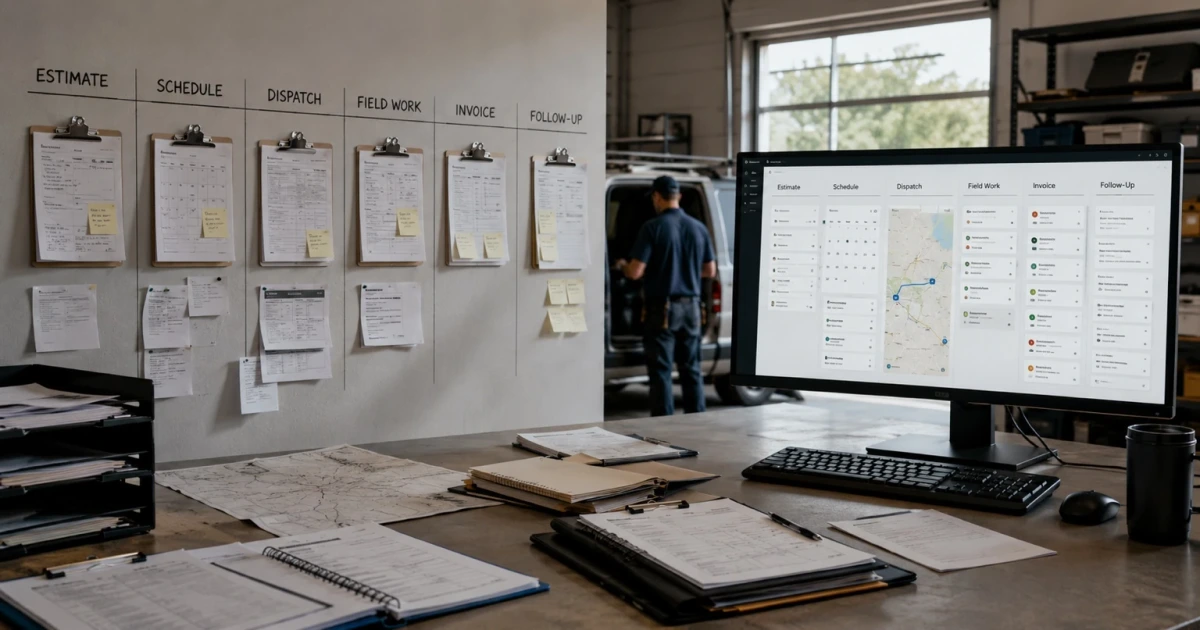
Most software asks a service business to change shape. You sign up, and within a month your team is naming things the tool's way, working in the tool's order, and keeping a second set of notes for everything the tool won't hold. A software system around your service business inverts that order: it starts from how the work already moves—estimate, schedule, dispatch, field work, invoice, follow-up—and gets built to carry that, not to correct it.
This isn't an argument that every business needs custom software. Plenty run well for years on tools they bought off a shelf. It's about the sequencing question that comes before any build: whose shape wins, the business's or the tool's.
What a Software System Around Your Service Business Actually Means
Start with a plain test. Write down, in your own words, the path a job takes from the first phone call to the last follow-up. Who touches it. What has to be true before it moves to the next step. Where it usually stalls.
That path is your workflow, and it existed before any software did. It came out of the trade, the crew size, the way your customers buy, and a decade of small corrections nobody wrote down. It is, in a real sense, the business.
Building the system around it means the software's structure matches that path: the same stages in the same order, the same words your team already uses, and the handoffs enforced where they actually happen. Building it the other way around means the path gets bent—one step out of order here, a stage that doesn't exist in the tool tracked in a group text there—until the software is technically in use and the real operation is running alongside it.
The Six Stages Almost Every Service Job Moves Through
The details differ by trade, but the skeleton is remarkably consistent.
Estimate. Someone asks what it costs. A number and a scope go out, along with an implicit promise about what happens next.
Schedule. The accepted job takes a slot: a date, a window, a crew, sometimes equipment. This is where a job first has to be real to more than one person.
Dispatch. The right person gets sent with the right information—the address, the access notes, the history, what was actually promised in the estimate. Dispatch is a handoff of context, not just of location.
Field work. The job gets done. Notes, photos, changes to scope, parts used, and whatever the customer said at the door all get created here—usually by someone with dirty hands and a phone in their pocket.
Invoice. What was promised, plus what changed on site, becomes a bill. Everything the field learned has to reach the office intact for the number to be right.
Follow-up. Confirmation, a review request, a warranty check, the maintenance reminder that turns one job into the next one.
Read that list again and notice something: jobs rarely fail inside a stage. Estimating is fine. Doing the work is fine. Sending an invoice is fine. They fail in the gaps—between the estimate and the schedule, between the field and the invoice—which is exactly where most software isn't looking.
Where Scattered Apps Start Breaking the Handoffs
A pile of good tools is not a system. Each one is complete inside its own stage and blind to the stages on either side.
The quoting tool doesn't know the job got scheduled, so nothing chases the quotes that went quiet. The calendar doesn't know the tech never received the site notes, so the crew arrives without the gate code. The field notes live in a text thread the office can't search, so the invoice gets built from memory a week later. The invoicing tool doesn't know the work finished Tuesday, so billing runs a few days behind by default. Nothing tells anyone the customer was never followed up with, because no single app owns "after."
Every one of those gaps gets filled by a person. Someone retypes the address into the second system. Someone texts a photo to the office. Someone remembers to check on the quote from two weeks ago. That works, right up until a busy week—and busy weeks are the ones with the most jobs in them, which is when the failures are most expensive.
The tell isn't that any single tool is bad. It's that the answer to "where does this job stand?" requires a phone call. That's the same pattern we walk through in what actually breaks when your systems don't talk to each other, and it's usually the first thing a connected system fixes.
What It Costs to Bend the Business Around the Tool
When the tool's shape wins, the cost shows up in ways that don't look like a software problem.
Your team maintains a shadow process—the spreadsheet, the whiteboard, the group text—for everything the tool can't hold. New hires learn two systems: the official one and the real one. Reporting stops being trustworthy, because the numbers in the tool only describe the part of the work that fit in it. And the parts of your operation that actually make you better than the competitor down the road get sanded down, because the tool had no field for them.
That last one is the real loss. Off-the-shelf software encodes the average version of your trade. Anything you do differently—the way you scope, the way you stage materials, the way you handle a repeat customer—is either extra manual work or it quietly stops happening. We covered the longer version of this in why off-the-shelf software stops working as your business grows.
When a Real System Becomes Worth It
Not yet, for a lot of businesses. If one tool covers most of your workflow and the gaps are small enough to close with a habit, stay there. That's the cheaper, faster answer and there's no prize for outgrowing it early.
The line moves when the problem stops living inside any single tool and starts living in the handoffs:
- The same information gets entered more than once, in more than one place.
- Jobs stall because the next step has no clear owner, and nobody notices until the customer calls.
- Answering "where does this job stand?" takes a phone call instead of a screen.
- The field and the office are working from different versions of the same job.
- You've started hiring, or considering hiring, to move information between systems rather than to do the work.
When several of those are true at once, the constraint is structural, and no additional app fixes a structural problem. That's the same threshold we lay out in custom software for service businesses. Whether the build returns more than it costs is the next question, and is custom software worth it works through how to judge that honestly.
How to Map Your Workflow Before Anyone Writes Code
The build doesn't start with features. It starts with an honest map.
Write the stages in your own words, not a vendor's. Mark every handoff—each point where work changes hands—and name who owns the next step at each one. Then mark where things actually stall, from memory of the last busy month, and note what gets typed twice today.
That map is the specification. It tells you which stage to build first, which is almost always the one leaking the most time or money rather than the one that's most fun to imagine. Close that handoff, confirm it holds under a real week, then widen to the next one. That sequencing—one leak at a time, proven before extending—is the same approach we recommend in what to automate first, and it's how a system gets built without stopping the business to build it.
Connecting tools you already own is a legitimate first move, too. If your calendar, phone system, and CRM each fit the way you work, the win may be wiring them together rather than replacing them. The goal is one connected operation, not one particular piece of software.
The System Should Look Like the Business
A software system built around a service business should feel unremarkable to use. The stages are the ones your team already names. The handoffs happen where they always happened, just without depending on someone remembering. Nothing has to be translated into the tool's vocabulary, because the tool learned yours.
At LoGa AI Systems in Oklahoma City, that's the work: mapping how a service business already runs—estimate through follow-up—and building the connected system around it, so the software matches the operation instead of the other way around. What that is supposed to produce on the other side is set out in outcomes.
Frequently asked questions
What does it mean to build software around your business instead of the other way around? It means the software follows the sequence your work already moves through—estimate, schedule, dispatch, field work, invoice, follow-up—instead of asking your team to work in whatever order the tool was designed for. The order, the words, and the handoffs come from your operation. The software's job is to carry them, not to redefine them.
What are the workflow stages a service business software system should cover? Six stages cover most service work: the estimate or quote, scheduling it, dispatching the right person with the right information, the field work itself, the invoice, and the follow-up afterward. Not every business needs all six built at once, but every business should be able to see where a job sits across all six, because that's where jobs get lost—between stages, not inside them.
Why do scattered apps break down as a service business grows? Because each app is complete inside its own stage and blind to the ones on either side. The quoting tool doesn't know the job was scheduled. The calendar doesn't know the tech never got the site notes. The invoicing tool doesn't know the work finished on Tuesday. Every gap between apps gets filled by a person retyping, texting, or remembering—and that person is the part that fails on a busy week.
When is a custom software system actually worth it for a service business? When the problem has moved out of any single tool and into the handoffs between them—when the same information is entered more than once, when jobs stall because nobody owns the next step, when answering a simple status question means calling someone. Below that point, one good off-the-shelf tool is usually the cheaper, smarter call, and it's worth staying there as long as it holds.
Do I have to replace all my current software to build a connected system? No, and usually you shouldn't. Tools that already fit how you work can often stay and be connected through their APIs, so the data moves without anyone retyping it. The build should start at the one handoff leaking the most time or money, prove it holds, and widen from there—not rip out a working stack on day one.