Mobile App Development Oklahoma City: When a Service Business Actually Needs One
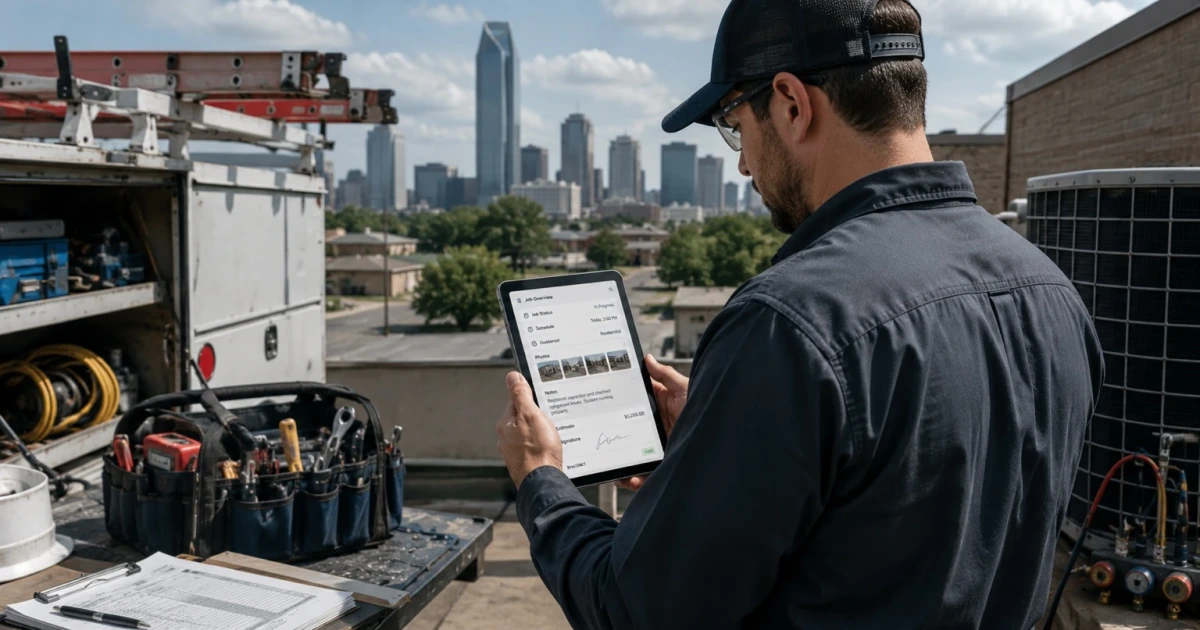
Most owners who search for mobile app development Oklahoma City aren't looking for something in the App Store. They're looking for a way to stop calling the crew for updates. So the real question isn't whether an app is possible — it's whether what your business is losing time on is actually a mobile problem.
Sometimes it is. A crew that spends the day on roofs, in crawl spaces, and in trucks is a business whose most current information lives in somebody's pocket. If that information can't move until the technician gets back to the shop, the office runs a few hours behind the field all day, every day.
And sometimes it isn't. Plenty of companies ask for an app when what they need is one place the job record lives that a phone browser can reach.
Here's how to tell which one you are.
What a Service Business Usually Means by "App"
Two very different things wear the same word.
The first is the consumer app — the one customers download to book you, track a technician, or pay a bill. It's a marketing and convenience product, judged by installs. For most local service businesses it's a hard sell, because a homeowner who calls a plumber twice a decade will not keep an app on their phone for it.
The second is the field app — the one your technicians and your office use to run the day. Nobody downloads it from an ad. It has maybe six screens. It's judged by one thing: whether the crew still uses it on a bad Friday in July.
Almost every owner asking about an app means the second one. Keep the two separate in your head, because they have almost nothing in common except the phone they run on.
Mobile App Development Oklahoma City: When It's Actually Worth It
The signals are practical, and you'll recognize them immediately if they're yours.
Nobody can answer "where is that job" without a phone call. The status exists — it's in a technician's head, on a truck, in a text thread. It just isn't anywhere the office can see it.
Photos live on personal phones. They get taken, texted to whoever asked, and lost. Six months later, when a customer disputes what was there before you started, nobody can find the picture.
The same information gets written twice. Handwritten in the field, keyed in at the office. That second entry is pure cost, and it's where details quietly change.
Invoices wait on the truck. Work finished Tuesday morning gets billed Thursday afternoon because the paperwork traveled home in a cab.
Technicians show up without what they need. Equipment model, what was quoted, what happened on the last visit, the gate code. All of it exists in the office. None of it is on site.
You're paying for a field tool built for a different trade. It nearly fits, so the crew works around it — a spreadsheet on the side, a group text for the parts it can't handle.
The rule of thumb: an app earns its place when the work happens away from a desk and the delay between doing that work and recording it costs real money. Both halves have to be true.
When You Don't Need One
This is the part most vendors skip.
Your crew is small enough to talk. Two or three people who see each other every morning have a working system already. Software would formalize a problem you don't have.
Your tools mostly work and just don't talk. If the scheduling app is fine and the accounting is fine and the pain is retyping between them, that's a connection problem, not an app problem — the plain-English version is in what an API integration actually is.
Your process isn't settled. An app freezes a workflow in place. If you're still changing how jobs get assigned every few weeks, build the habit first and the software after.
What you actually want is customer-facing booking. That's a website and scheduling job, and it's cheaper and faster than an app.
The phone browser would do it. A well-built mobile web page reaches every phone your crew already owns, needs no store approval, and updates the minute you change it. That's a legitimate finished answer, not a lesser one.
If you would rather read that judgment as a set of positive signals than as a list of exceptions, they are in the signs a small business is ready for a custom mobile app.
The Field Workflow, Step by Step
When a field app is right, this is the loop it has to carry. Each of these is a place information currently stalls.
Job status. On the way, on site, in progress, done, needs a return trip. One tap from the technician, visible instantly at the office. This single feature ends most of the update phone calls by itself.
Photos. Taken inside the app, attached to the job record, not the camera roll. Before and after, the model plate, the damage, the finished install. They're evidence, and evidence only counts if it's attached to the right job.
Notes. What was found, what was done, what to watch next visit. Typed or dictated on site while it's fresh, not reconstructed at 6pm.
Signatures. Customer signs on the screen for the work approved and the work completed. The signature lands on the job record with a timestamp, which is what makes it worth anything later.
Scheduling. The technician sees today and tomorrow. When dispatch moves something, the phone shows it — no call, no "did you get my text."
Invoices. The line items come from what was actually done, so billing starts when the job closes instead of when the paperwork arrives. For many companies this is the fastest-paying piece of the whole build.
Office-to-field sync. Everything above is only useful because both sides read and write the same record. The dispatcher's change appears on the phone; the technician's photo appears on the office screen. That's the product. The screens are just how people touch it.
Two details that separate a field app that gets used from one that gets abandoned: it has to work with no signal, holding the work locally and sending it up when coverage returns, and it has to be faster than the paper it replaced. If it takes a technician longer than the form did, it will lose, and it should.
What Building One Actually Involves
Map the day first. Follow a real job from the call to the invoice, and write down every place a person carries information across a gap. That map — not a feature list — is the spec. It's the same sequencing as building the software system around your service business.
Start narrow. Today's jobs, status, photos, notes, signature. Five screens the crew can learn in one morning. Anything you're unsure about, leave out — adding is easy, removing something people have started depending on is not.
Decide the device question early. Company phones or personal ones, phones or tablets, who pays for the data. It's an unglamorous decision that determines whether the thing actually gets carried.
Connect it to what already exists. The app is a window onto the job record; it isn't a new island. If your scheduling, customer history, or accounting lives somewhere that works, wire the app to it.
Plan for the un-fun parts. Password resets, a new hire on Monday, a phone left on a roof, an operating-system update in the fall. A field app is a piece of equipment, and equipment needs an owner and a maintenance line.
If you're not sure yet whether the answer is an app, a connected web system, or just better plumbing between the tools you have, that's the honest starting question — and it's usually answered by walking one job end to end, not by a demo. If it's time to have that conversation, see how the connected system works, or book an audit and we'll map where your information actually stalls. And if you're still deciding whether custom software makes sense at all, start with when a spreadsheet stops being enough.
Frequently asked questions
Does my service business actually need a mobile app? You need one when the work happens away from a desk and the delay between doing the job and recording it is costing you money — status nobody can answer without a phone call, photos stuck on personal phones, paperwork typed twice, invoices waiting on the truck to come back. If none of those hurt, you probably need your existing tools connected, not a new app.
What is the difference between a mobile app and a mobile-friendly web app? A mobile-friendly web app runs in the phone's browser and updates the moment you change it. A native app is installed from the App Store or Google Play, can use the camera and location more directly, and works better with no signal — but it carries store review, per-platform builds, and yearly operating-system upkeep. Most field workflows can start as a web app and move native only if something specific requires it.
How much does mobile app development cost in Oklahoma City? It depends almost entirely on how many screens the crew truly needs and how many systems the app has to stay in sync with. A focused field app covering a handful of steps is a materially different project from a full platform. The honest way to price it is to scope the smallest version that closes one expensive gap, build that, and decide on the next piece once it has run through a busy week.
What should a field app do on day one? Show the technician today's jobs with the address and the history, let them change job status, attach photos and notes to the job record, and capture a signature. That is usually enough to end the update phone calls and stop information from arriving hours late. Scheduling changes, invoicing, and reporting can be layered on once the first loop holds.
Do technicians need a signal for a field app to work? A well-built field app assumes they will not have one. Crawl spaces, metal buildings, and rural service calls all drop coverage. The app should hold the work locally — status changes, photos, notes, signatures — and send it up when the phone reconnects, without the technician thinking about it or entering anything twice.